so I’ve made a jump from version 1.5.4 to 1.16.2 (on Mac), and so could have missed any feedback/reasoning regarding the following, but here’s mine:
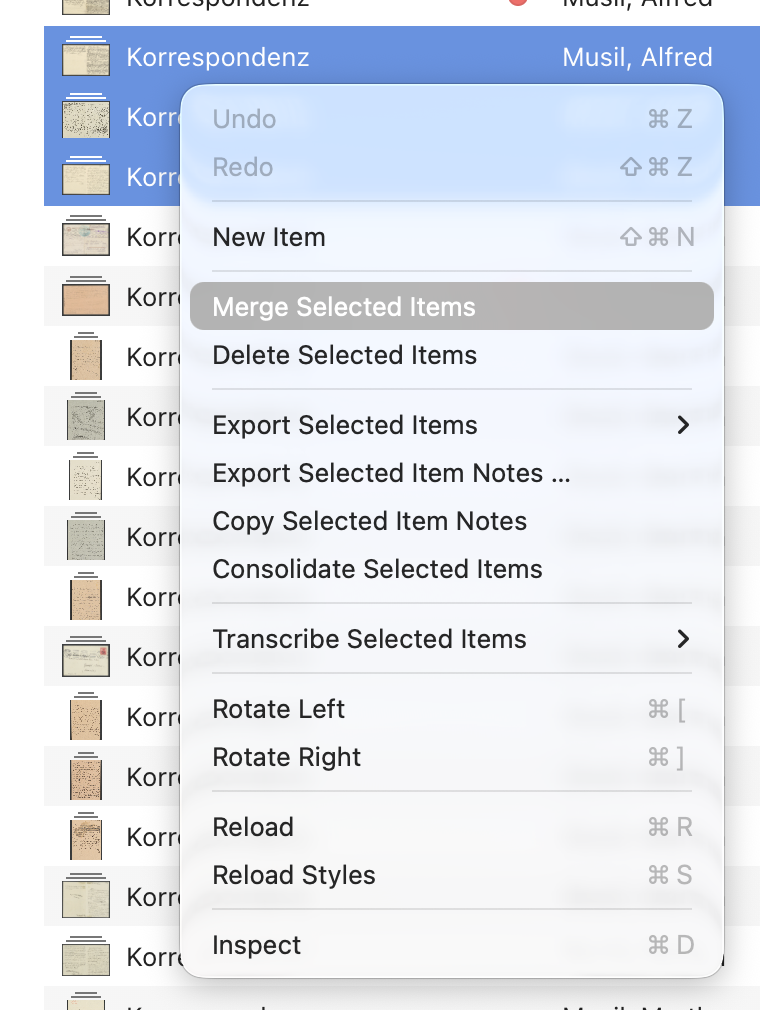
when I add photos to the list, the first thing I do is merge them, where appropriate, so previously, the right-click menu was short and quick:
undo
new
merge
export >
delete
now, ‘merge’ might as well be out of frame:
undo
redo
new
remove
export
export
copy
consolidate
merge
etc
etc
etc
etc
as far as I’m concerned, this is counter intuitive, and I appreciate this is bordering ‘muscle memory’ territory, but is there perhaps a way to modify the context menu to hide/disable commands I hardly ever use, or at least re-arrange their order?
and secondly, when tagging items, I used to be able to select a tag from the list of those already available by using the arrow keys, so if I had, say, tags for ‘address 1’ to ‘address 30’, I could start typing ‘address’, go down to approximate tag and finish the sequence with the ‘right’ arrow key; modify the tag by selecting it and changing the number; or add a new number to only ‘address’ - now I can only choose the exact tag or have to type it all if it’s new.
not sure why this option had to be removed, but I’m happy to have it back in exchange for ‘all sub-lists glaring in blue with the root list selected’.
edited syntax.